From Lovable to Production: Building the WC 2026 Live Insights Widget with Cursor
The Idea
For the 2026 FIFA World Cup our team at Enetpulse wanted to release something new for our clients: a free embeddable widget that surfaces match insights in a clean, configurable way. The widget needed to pull together several of our existing data products: live scores, livetips, live commentaries, and betting odds, all presented through a real-time configurator where clients could adjust the look and feel and grab an embed code for their own site.
The tricky part was the timeline. The World Cup wasn't going to wait, and we wanted to use this as a genuine test: how much of a production-ready project can you build with AI tooling alone?
What We Were Building
Before any code was written, the product team put together a proper specification covering the widget itself, the configuration platform around it, and the data and embed model.
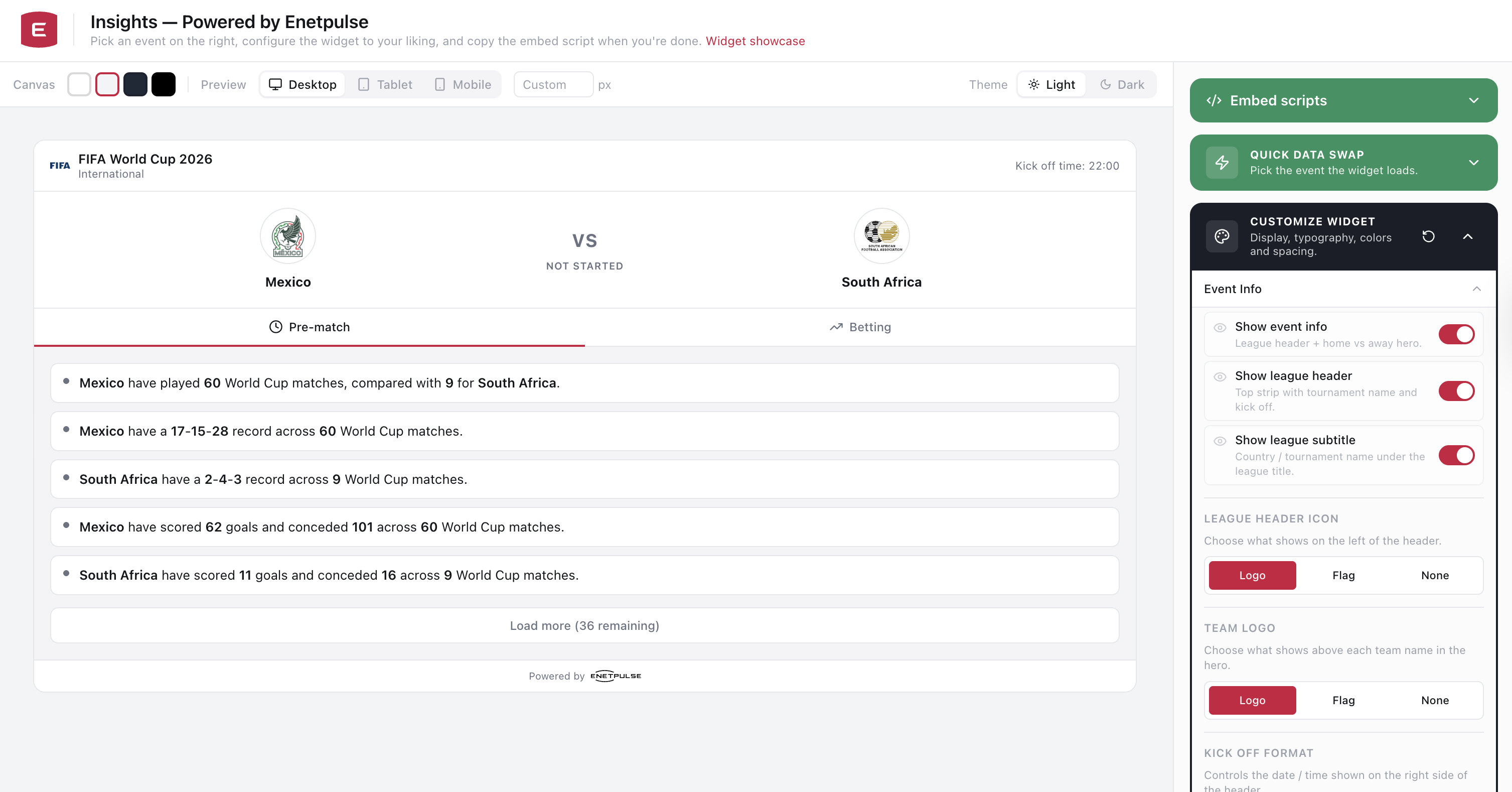
The widget had three main content tabs (Pre-match, Live, and Betting), each controlled by match status and user configuration. The configurator platform wrapping it needed a live preview canvas, a right-side panel with accordion sections, embed code generation, and full multilanguage support.
That was the target. The question was how fast we could get there.
Phase 1: Lovable Prototype
Our PMs kicked things off in Lovable. Rather than writing a word of code themselves, they worked directly in the AI-first design tool to produce a fully interactive prototype of the configurator with mock data. The result was a working React interface with an event selector, configuration panel, widget preview, and embed code section, all in place before any developer touched it.
The codebase was running on Bun.js and served as the foundation to hand over. Mock data, placeholder components, and all, but the structure and the UX decisions were already there.
Phase 2: Handover and Migration
I downloaded the Lovable export, opened it in Cursor, and started from the top.
The first task was migrating the stack. I prompted Cursor to move the project to Next.js (App Router) for the frontend and Fastify with TypeScript for the backend. It handled the migration well; the structural work was largely mechanical and the AI did it in one pass, leaving me with a fully functional copy of the Lovable project running on the new stack.
The monorepo ended up structured like this:
| Path | Description |
|---|---|
apps/web |
Next.js 16 (App Router): configurator, /widget embed page, public/embed.js loader |
apps/api |
Fastify BFF: internal API proxy, tournament list + per-event widget payload |
packages/shared |
Shared Zod schemas and helpers for widget/embed configuration |
apps/e2e |
Playwright end-to-end tests (configurator, widget, embed) |
Phase 3: Real Data
With the stack in place, the next step was replacing mock data with the real thing. The widget needed to connect to our internal API to pull live event data: match status, scores, elapsed time, team names and visuals, tournament information, livetips, and betting odds.
I worked through the backend systematically: tournament list endpoint, per-event payload endpoint, odds feed integration, livetips. Cursor handled the boilerplate and wiring quickly, and I focused on making sure the data contracts matched what the widget expected. The specs had already defined exactly what fields were needed and how the fallback logic should work, so translating that into real API responses was straightforward.
Phase 4: Translations
Once the data was wired up, I added full multilanguage support. The widget needed to render correctly in whatever language the client embedded it with, and that language needed to flow through from the configurator selector into the embed context.
Cursor did most of the mechanical work: extracting hardcoded strings, setting up the translation layer, and wiring the language selector through to the widget preview. After this pass the configurator had a working language dropdown and the widget reflected the selected locale immediately.
Phase 5: Deployment
With a working demo I could show to the PM team, I set up the deployment pipeline on GitLab. The pipeline SSH'd into the server and ran the standard sequence: pull from GitLab, install npm packages, build the project, and restart the PM2 process.
I deliberately made the deploy step manual at this stage. There were no tests yet and I wasn't going to auto-deploy something that hadn't been validated, even on a demo server.
Phase 6: Tests
The natural next step was confidence. I had Cursor write proper unit tests for everything in the codebase using Vitest, covering the API endpoints, data transformations, configuration logic, and shared schemas. The total came to 149 tests.
After QA reviewed the demo and returned a handful of fixes, I also added Playwright end-to-end tests covering the configurator flow, widget rendering, and embed behavior, 31 tests in total.
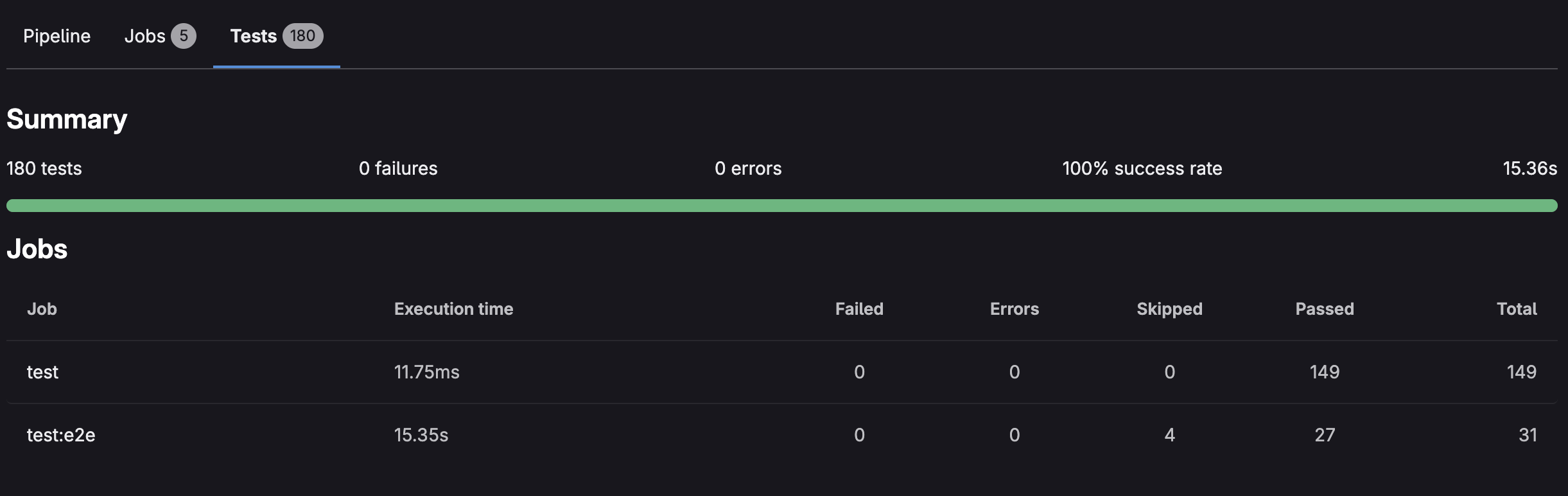
With both suites passing, I changed the deploy step to automatic. The pipeline only proceeds to production if all tests pass.

Phase 7: Redis Cache
The last piece was caching. The widget auto-refreshes every 60 seconds, which means the API gets hit constantly for the same event data. I added Redis as a caching layer in front of our API calls, with TTLs tuned to the data type:
- Live event data: 1 minute (or less for certain fields)
- Finished event data: 7 days
I made sure to tell Cursor to take event status into account when setting cache durations; live data needs to be fresh, finished data can be cached aggressively.
The AGENTS.md Trick
One thing I integrated early on that paid dividends throughout: an AGENTS.md file at the root of the repo. This file gave Cursor a persistent context for the project: what the architecture was, what the coding conventions were, and one hard rule: always write tests for new code and update existing ones when making changes.
Because Cursor reads this file on every request, I didn't have to remind it about tests once. It just did it.
The Result
Three days of development. Under $100 in Cursor tokens. A production-deployed, fully configurable, embeddable widget for the 2026 World Cup, with 180 tests, a Redis cache, a GitLab pipeline, multilanguage support, and real Enetpulse data behind it. Released for free to all our clients.
The demo is live at live-insights.enetdemo.com.
The takeaway is straightforward: if you know exactly what you want, and you have the technical depth to direct the AI precisely and catch its mistakes, you can compress a multi-week project into days. The AI is fast at the mechanical work. The human is still responsible for the architecture, the judgment calls, and the quality bar.
Thank you for reading, and let's connect!